Gifting
Let your fans support you with one-time monetary gifts. Enable gifting in Engagement to offer set amounts (e.g. $5, $10); viewers choose an amount and pay to support your channel.
Where to find it
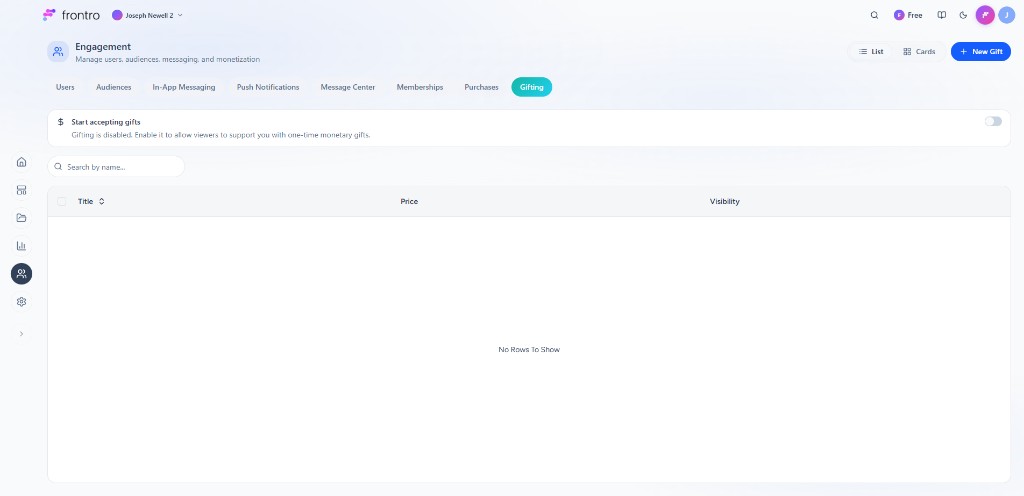
In the left navigation, open Engagement, then the Gifting tab. Turn on Start accepting gifts to allow viewers to send one-time monetary gifts. Use Search by name, List / Cards view, and + New Gift to manage gift options. The list shows Title, Price, and Visibility.

Overview
Gifting turns your most passionate fans into ambassadors. When gifting is enabled, viewers can support you with one-time monetary gifts. You define gift amounts and visibility; you earn revenue from each gift.
How it works
- You enable gifting and create gift options (e.g. $5, $10) in Engagement → Gifting.
- Viewers choose a gift amount and complete the payment.
- You receive the support; viewers may be able to add a message or recognition depending on your setup.
Creating gift options
- In Engagement → Gifting, ensure Start accepting gifts is enabled.
- Click + New Gift.
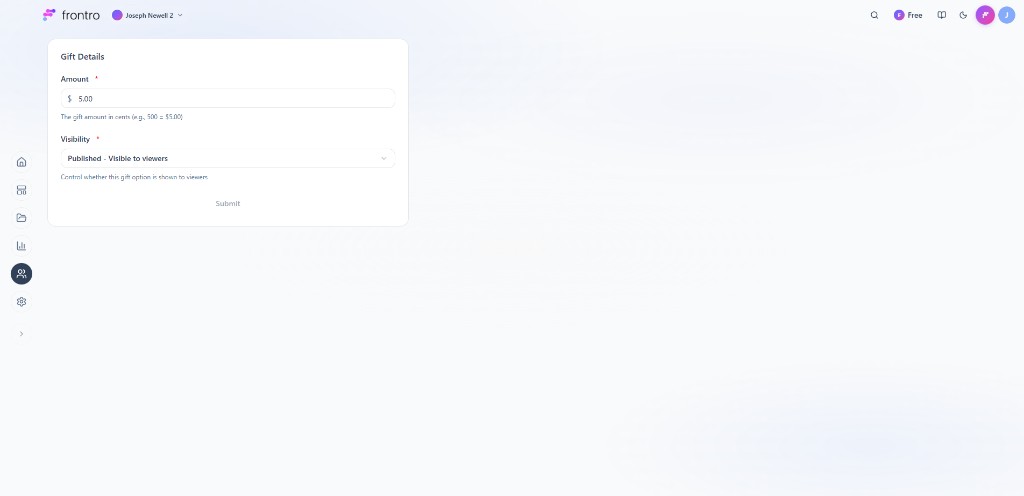
- In Gift Details, set:
- Amount (required) — The gift amount. Enter in cents (e.g. 500 = $5.00).
- Visibility (required) — e.g. Published – Visible to viewers or Draft; controls whether the option is shown.
- Click Submit to save.

Gift experience
Viewers see the gift amounts you publish (e.g. $5, $10) and can complete a one-time payment to support you. Depending on your channel setup, they may be able to add a message or appear in a supporter list. You receive the revenue from each gift.
Managing gifts
In Engagement → Gifting you can:
- Toggle Start accepting gifts on or off
- Search and filter gifts by name; switch between List and Cards
- Add more options with + New Gift and edit Amount and Visibility in Gift Details
- View gift activity (e.g. total gifts, revenue) where available in the dashboard
Best practices
- Promote gifting — Mention the gifting option in your content and community
- Seasonal campaigns — Run gifting promotions during holidays or milestones
- Recognize gifters — Thank generous community members publicly to encourage more gifting
- Bundle gifts — Create attractive gift bundles that combine memberships with bonus content
- Gift incentives — Consider offering a small bonus to the gifter (e.g., a badge or recognition)
Related documentation
- Subscriptions — Membership tiers that can be gifted
- One-Time Purchases — Products that can be gifted
- Monetization Overview — All monetization options
- Community — Community features that drive gifting engagement