Subscriptions
Offer subscription tiers so viewers can become members and get access to exclusive content, benefits, and community features.
Where to find it
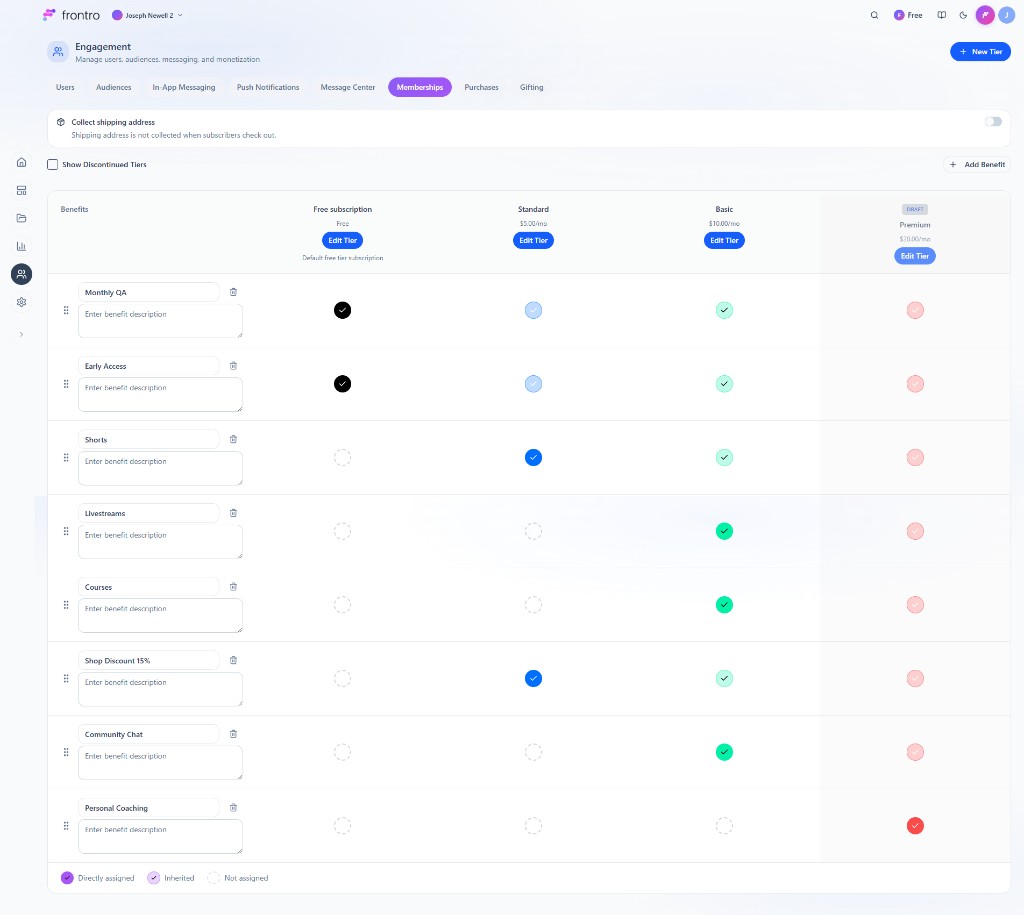
In the left navigation, open Engagement, then the Memberships tab. Here you manage tiers, benefits, and options like Collect shipping address and Show Discontinued Tiers. Use + New Tier to add a tier and Add Benefit to add benefits; assign benefits to tiers in the matrix (Directly assigned, Inherited, or Not assigned).

Overview
Subscriptions (channel memberships) let you earn recurring revenue by offering tiered plans. Viewers choose a tier, pay monthly or annually, and get access to the benefits you define—such as members-only videos, courses, chat access, badges, and discounts.
Why use subscriptions
- Recurring revenue — Predictable income from members every month or year.
- Tiered offerings — Create multiple tiers (e.g. Fan, Supporter, VIP) with different prices and benefits.
- Exclusive access — Gate content, Community Chat topics, Courses, and more by tier.
- Member benefits — Offer badges, custom perks, and One-Time Purchases or ad-free experiences where supported.
Subscription tiers
Creating tiers
- In Engagement → Memberships, click + New Tier.
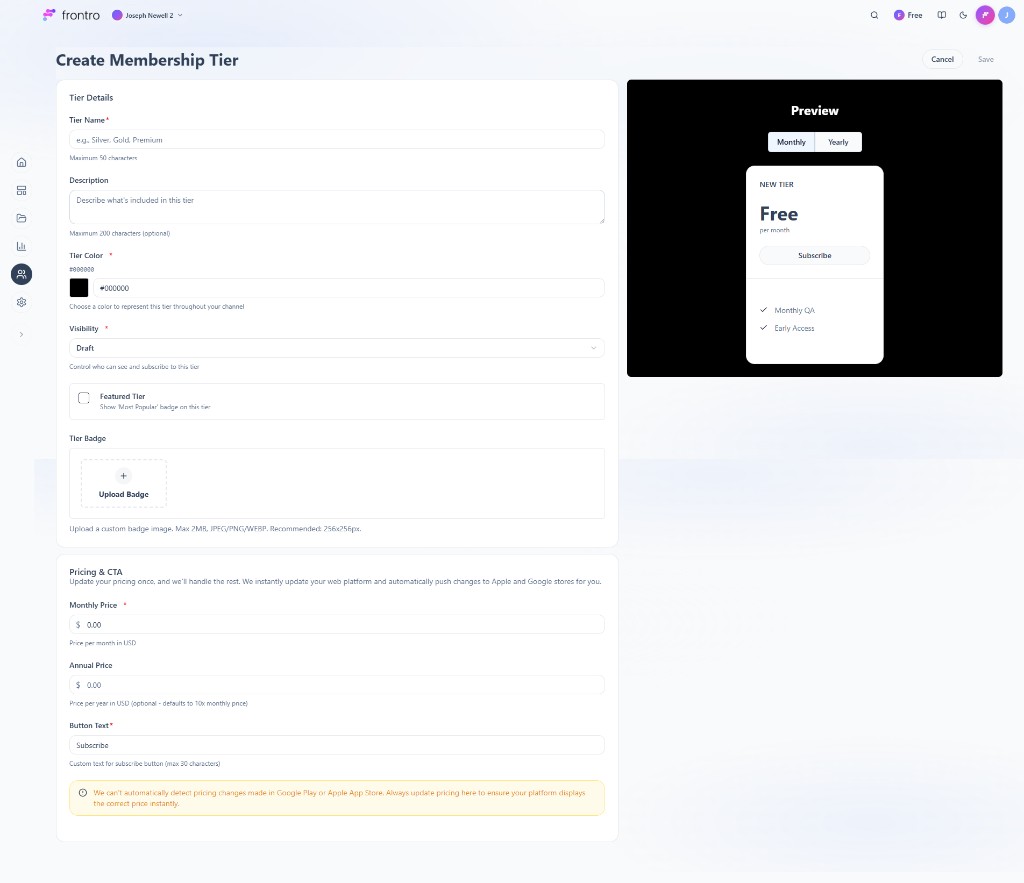
- In the Create Membership Tier form, set:
- Tier Name (required) — e.g. “Silver”, “Gold”, “Premium” (max 50 characters).
- Description (optional) — What’s included (max 200 characters).
- Tier Color (required) — Color for the tier across your channel.
- Visibility (required) — e.g. Draft or Published; controls who can see and subscribe.
- Featured Tier — Optional “Most Popular” badge.
- Upload Badge — Optional custom badge image (max 2MB, JPEG/PNG/WEBP; 256×256px recommended).
- Monthly Price and Annual Price (optional; defaults to 10× monthly).
- Button Text (required) — e.g. “Subscribe” (max 30 characters).
- Use the Preview panel (Monthly/Yearly toggle) to see how the tier card looks. Click Save.
Update pricing in this form so it stays in sync with web and app stores; pricing changes here are pushed to Apple and Google.

Benefits you can attach
- Content access — Restrict videos, livestreams, courses, or Shorts by tier.
- Community — Restrict Chat topics or categories by tier.
- One-time purchases — Offer member-only pricing or access to One-Time Purchases.
- Badges / recognition — Show tier badges in chat or on profiles (if supported).
- Other perks — Custom benefits you describe (e.g. early access, exclusive DMs).
Pricing and billing
- Monthly vs annual — You can offer both; annual is often discounted to encourage longer commitment.
- Currency — Set per your channel/region; viewers are charged in the displayed currency.
- Trials — If your channel supports free trials, configure them per tier (e.g. 7-day trial before first charge).
- Cancellation — Members can cancel anytime; access usually continues until the end of the current billing period.
- Trials and payment failures — Where supported, configure trial-ending reminders and payment-failed behavior (e.g. retries, notifications) in Settings → Notifications or subscription settings so members stay informed and you can recover revenue.
Managing subscribers
In Engagement → Memberships you can typically:
- View members — See who is subscribed to which tier.
- Revenue and retention — See subscription revenue, churn, and growth over time.
- Change tiers — Upgrade or downgrade members (behavior depends on your setup).
- Refunds — Handle refunds via your payment/support process; canceled members lose access at period end unless you extend manually.
For viewers
Subscribing
- Find Subscribe, Membership, or Join on the creator’s channel or app.
- Choose a tier and billing (monthly or annual).
- Complete payment; access to tier benefits starts immediately.
Managing a subscription
- Upgrade/downgrade — Change tier from the membership or billing section; the new price usually applies at the next renewal.
- Cancel — Use Cancel membership (or similar); access continues until the end of the paid period.
- Billing — Update payment method or view invoices in Account or Billing settings.
Best practices
- Clear value — Describe what each tier includes in plain language.
- Use tiers to gate content — Attach subscription requirements to content, chat, and courses so members see clear benefit.
- Promote annual — Offer a meaningful discount for annual billing to improve retention and revenue.
- Communicate — Use In-App Messages or Push Notifications to announce new benefits or remind at renewal.
FAQ
Can I have both subscriptions and one-time purchases?
Yes. Use One-Time Purchases for single items; use subscriptions for ongoing access.
Can I restrict chat or content by tier?
Yes. When configuring Chat topics or content access, select the required subscription tier.
What happens when someone cancels?
They keep access until the end of the current billing period; after that they lose tier benefits.
Do you support free trials?
If your channel has trials, they’re configured per tier in the Subscriptions/Memberships settings.
Related documentation
- Monetization Overview — All revenue options
- One-Time Purchases — Sell single items
- Community Chat — Gate topics by tier
- Courses — Gate courses by subscription