
Content Overview
Frontro supports multiple content types so you can publish video, short-form clips, courses, and livestreams from one channel.
Where to find it
In the left navigation, open Content. The subtitle describes the section: “Manage your videos, Shorts, livestreams and more.” Use the content-type tabs to switch between:
- Videos — Grid or list of videos with stats (Total Videos, Total Views, Watch Time, Added This Month). Search by title, Filters, List / Cards view, and + Video to upload.
- Shorts — Short-form vertical clips; + Reel to add. Stats: Total Shorts, Total Views, Watch Time, Added This Month.
- Livestreams — Scheduled and past livestreams; + Livestream to create. Stats: Total Livestreams, Total Views, Watch Time, Added This Month.
- Go Lives — Portrait livestreams from the mobile app.
- Polls — Interactive polls; + Poll to create. Stats: Total Polls, Active Polls, Total Votes, Average Votes.
- Files — Uploaded files; + File to add. Stats: Total Files, Added This Month.
- Courses — Courses and instructors sub-nav; + Course to create. Stats: Total Courses, Total Lessons, Added This Month.
- Chat Topics — Community chat topics; + Topic to create. Stats: Total Topics, Total Threads, Members, Added This Month.
- Localization — Language and locale settings for content.
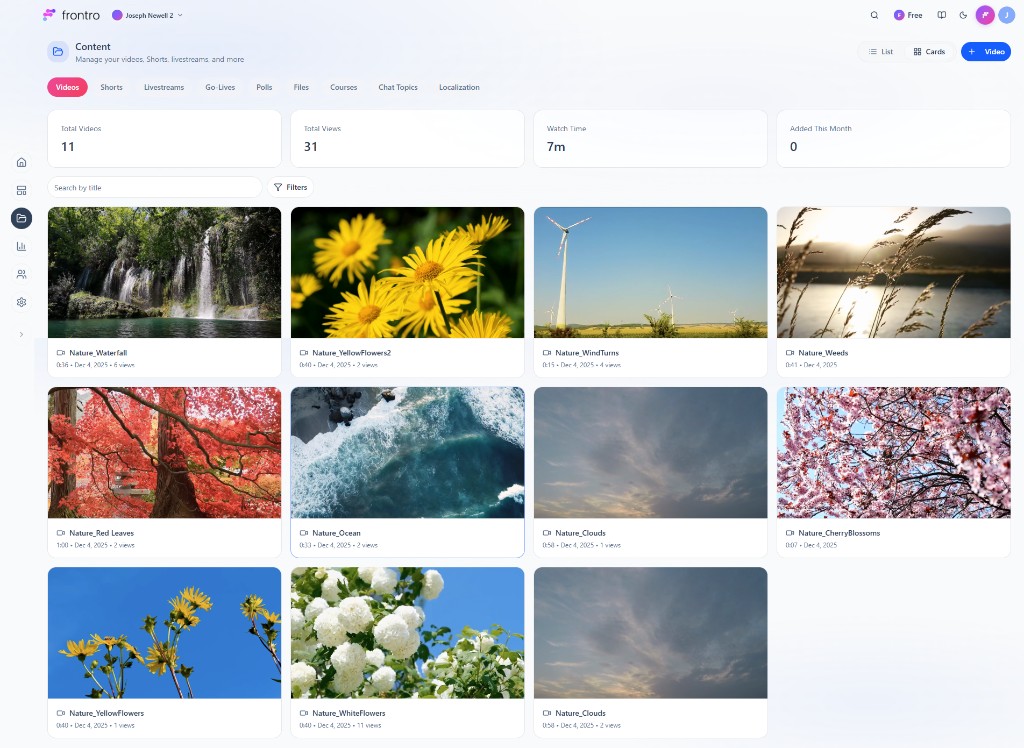
Content types
| Type | Description | Learn more |
|---|---|---|
| Video | Long-form and standard videos; upload, organize, and gate by subscription or one-time purchase. | Video |
| Shorts | Vertical, short-form videos (e.g. 9:16); ideal for mobile and a dedicated Shorts feed. | Shorts |
| Courses | Structured learning with sections, lessons, videos, and downloads; gate by tier or one-time purchase. | Courses |
| Livestreams | Live video via RTMP with external encoders; schedule, stream, and monetize. | Livestreams |
| Go-Lives | Portrait-mode livestreams started directly from the Frontro mobile app. | Go-Lives |
| Downloadables | Digital files (PDFs, templates, presets, etc.) viewers can download and keep. Managed under Content → Files in the app. | Downloadables |
| Polls | Interactive polls for your audience; control result visibility and access. | Polls |
| Chat Topics | Topics for Community Chat; create and categorize topics. | Community Chat |
Shared concepts
Upload and management
- Content library — All content types are managed from the creator dashboard (e.g. Content, Videos, Courses, Livestreams). Use filters and search to find items.
- Metadata — Titles, descriptions, thumbnails, and tags help viewers discover content and help you organize.
- Visibility — Content can be public, unlisted, or private; you can also limit by audience.
Access and monetization
- Free — Content can be free for everyone or for certain audiences.
- Subscription — Restrict access by subscription tier so only members can view.
- One-time purchase — Gate content with One-Time Purchases so viewers pay once for access.
- Ads — Monetize with ads on video and livestreams; optionally offer ad-free subscriptions.
Discovery and layout
- Builder — Use the Builder to place content sections (e.g. featured video, Shorts feed, course list, upcoming livestreams) on your channel.
- Search — Viewers can search within your channel when search is enabled; metadata and titles improve discoverability.
Choosing the right format
- Tutorials and long-form → Video or Courses.
- Quick clips and mobile-first → Shorts.
- Live events and Q&As → Livestreams (landscape) or Go-Lives (portrait, from mobile).
- Structured learning → Courses with lessons and downloads.
- Files and resources → Downloadables for PDFs, templates, presets, etc.
Next steps
- Video — Upload and manage long-form video
- Shorts — Create short-form vertical video
- Courses — Build and sell courses
- Livestreams — Go live with RTMP
- Go-Lives — Portrait livestreams from mobile
- Downloadables — Share digital files and resources (Content → Files in the app)
- Polls — Create polls (Content → Polls)
- Community Chat — Chat topics (Content → Chat Topics)
- Channel Content — Organize and manage content in the dashboard
- Builder — Arrange content on your channel